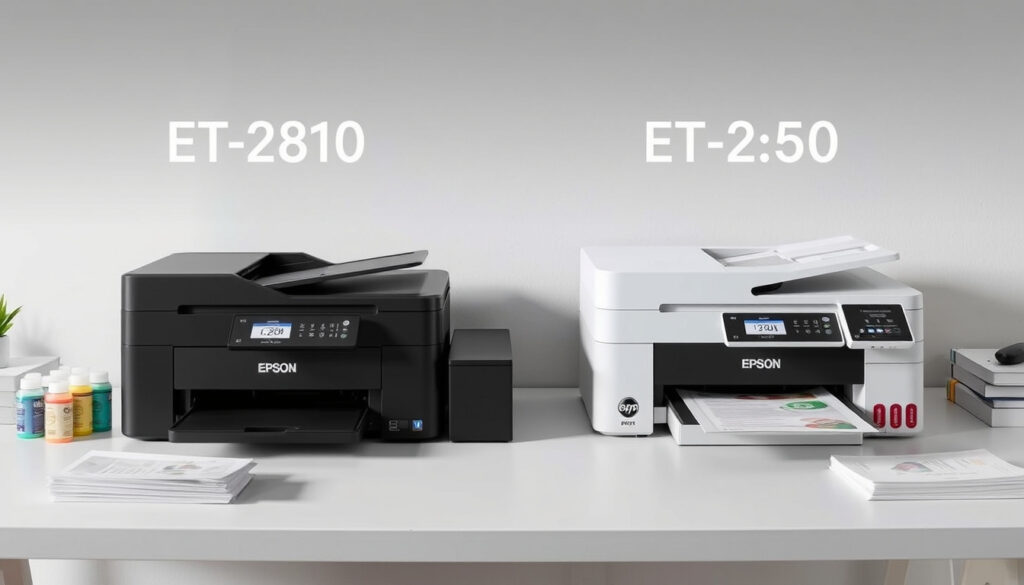
Epson EcoTank ET-2810: Pros, Cons, and Comparison to ET-2850
Few printer decisions spark as much head-scratching as choosing between an ink-saving EcoTank and a traditional cartridge model. The Epson EcoTank ET-2810 promises to slash ink costs by up to 90% while including enough ink bottles for up to three years of printing, according to Epson UK official product page.
Ink included: Up to 3 years of ink bottles ·
Ink savings: Up to 90% vs. cartridge printers ·
Functions: Print, scan, copy ·
Connectivity: Wi-Fi, USB ·
Nozzle configuration: 180 black, 59 per color
Quick snapshot
- Includes up to 3 years of ink (Epson UK official page)
- 180 black nozzles, 59 per color (Epson UK official page)
- Exact print speed not specified on official page (Epson UK official page)
- Whether drying occurs after two weeks idle (HighTechDad tech reviewer)
- ET-2850 user reports no ink replacement needed after long use (HighTechDad tech reviewer)
- Epson ink dispute ongoing — check ink availability (HighTechDad tech reviewer)
Six key specifications, one standout: the ET-2810’s ink-tank system eliminates cartridges entirely, but the lack of a display and automatic document feeder signals its budget positioning.
| Specification | ET-2810 Value |
|---|---|
| Print Technology | Epson Micro Piezo Inkjet (Epson UK official page) |
| Functions | Print, Scan, Copy (Epson UK official page) |
| Connectivity | Wi-Fi, USB (Epson UK official page) |
| Display | No display (LED indicators) (Epson UK official page) |
| Ink Bottles Included | Yes (3-year supply) (Epson UK official page) |
| Nozzle Configuration | 180 Black, 59 per color (Epson UK official page) |
The pattern: Epson stripped the ET-2810 to essentials — no screen, no duplex, no ADF — to hit a lower price point. For home users who print occasionally, that might be fine. For anyone scanning multi-page documents, it’s a hard pass.
“Save up to 90% on ink costs” — Epson marketing, from Epson UK official page
What are the downsides of Epson EcoTank?
Ink drying issues
Users report that EcoTank printers can develop clogs if left idle for weeks. HighTechDad (tech reviewer) notes that while the ET-2850 performed well with regular use, the risk of nozzle drying is a known concern across the EcoTank line. Epson includes a print head cleaning utility, but heavy cleaning cycles waste ink.
EcoTank buyers trade cartridge simplicity for bulk ink. The ET-2810 holds enough ink for years, but idle periods turn that advantage into a liability. HighTechDad (tech reviewer) confirms regular use is the only reliable preventive measure.
“Not a speed demon” — HighTechDad (tech reviewer) on the ET-2850, from his review
The implication: if you print less than once a week, the ink savings vanish into cleaning cycles and wasted ink.
Initial cost
The ET-2810’s upfront price is higher than comparable cartridge-based models. While Epson claims Epson UK (manufacturer’s product page) “save up to 90% on ink costs,” the initial investment can be $50-$100 more than a basic inkjet. That math only works if you print enough to use the included ink before the printer fails.
Customer support complaints
Epson has faced legal scrutiny over its ink policies. The Recycler (industry trade publication covering printer disputes) reported on an ongoing legal battle involving Epson’s ink refill restrictions. Some users report frustration with Epson’s support for print head issues, though official warranty terms vary by region.
Why this matters: if your ET-2810 develops a clog outside the warranty window, repair costs can approach the printer’s purchase price.
What is the difference between Epson EcoTank ET-2810 and ET 2850?
Print speed differences
A YouTube comparison (home-tech creator with hands-on testing) claims the ET-2850 is slightly faster for color printing than the ET-2800 (which is the US name for the ET-2810 family). Neither model is a speed demon — HighTechDad (tech reviewer) describes the ET-2850 as “not a speed demon.” Expect draft documents, not office-grade throughput.
Feature differences
The ET-2850 includes automatic double-sided printing (duplex), while the ET-2810 lacks this feature entirely, per the same YouTube comparison (home-tech creator). The ET-2850 also has a small display panel, whereas the ET-2810 uses only LED indicators. Neither model has an automatic document feeder. HighTechDad (tech reviewer) lists no Ethernet port and no ADF as cons for the ET-2850.
Price difference
The ET-2850 typically costs $20-$40 more than the ET-2810. That premium buys duplex printing and a basic display. For home users who never print double-sided, the ET-2810 offers identical core ink-tank technology at a lower entry point.
The pattern: the ET-2850 is a modest step up, not a generational leap. If you don’t need duplex, the ET-2810 delivers the same ink savings for less.
Four differences, one takeaway: the ET-2850’s duplex and display are convenience features, not performance upgrades. The ink system is identical.
| Feature | ET-2810 | ET-2850 |
|---|---|---|
| Print, Scan, Copy | Yes (Epson UK) | Yes (Epson UK) |
| Wi-Fi | Yes | Yes |
| Automatic Duplex | No | Yes (YouTube comparison) |
| Display | LED only | Small screen (HighTechDad) |
| Automatic Document Feeder | No | No (HighTechDad) |
| Paper Input Capacity | 100 sheets | 150 sheets (YouTube comparison) |
The implication: for the extra cost, the ET-2850 buyers get duplex printing and a capacity bump. If neither matters, the ET-2810 is the smarter buy.
Is the Epson ET2800 a good printer?
The ET2800 is the US-market name for the same printer as the ET-2810, according to TechRadar (tech publication with multi-model comparisons). It is the budget EcoTank offering, trading features for a lower price.
Pros
The ET2800 includes the full EcoTank ink system — up to Epson UK (manufacturer’s spec page) claims 3 years of ink in the box. Setup is straightforward, and mobile printing via Epson iPrint is included. HighTechDad (tech reviewer) rated the ET-2850 easy to set up, a trait shared across the 28xx platform.
Cons
No automatic duplex, no display, no ADF, and no Ethernet port. The print speed is modest. HighTechDad (tech reviewer) noted the ET-2850 has a small screen and no touchscreen, meaning the ET-2810 is even more stripped down.
Comparison
The ET-2810/ET2800 and ET-2850 share the same print engine and ink system. The only differences are duplex printing, a screen, and paper capacity. For basic home printing — school assignments, recipes, forms — the ET-2810 is perfectly adequate. For anyone who prints double-sided documents or scans multi-page files, spend extra.
The trade-off: the ET-2810 is a good printer for its price segment, but “good” means accepting its limitations. If you need office-grade features, look at the ET-2850 or a higher-tier EcoTank.
Do EcoTank printers dry out if not used?
Why ink dries
EcoTank printers use water-based pigment ink. When the printer sits idle, solvent evaporates from the nozzle openings, leaving dried pigment that blocks ink flow. HighTechDad (tech reviewer) used the ET-2850 for a long period without issues, but that was with consistent use. For intermittent users, the risk is real.
How to prevent drying
Print at least once a week to keep ink flowing through the nozzles. Epson’s software includes a nozzle check and cleaning cycle, but HighTechDad (tech reviewer) notes that excessive cleaning wastes ink. Turning the printer off between uses may help, as the print head parks in a sealed position.
Cleaning process
The ET-2810 includes a built-in print head cleaning utility accessible through its software. If nozzles clog, run the cleaning cycle 1-2 times. If clogs persist after three cycles, Epson recommends manual cleaning or service. HighTechDad (tech reviewer) warns that heavy cleaning cycles consume significant ink.
The catch: the cleaning cycle uses ink to clear clogs. If the printer dries out after two weeks of non-use, the “ink savings” get consumed by maintenance.
Does the Epson EcoTank ET-2810 come with ink?
Ink bottles included
Yes. The ET-2810 ships with a full set of ink bottles — one each of black, cyan, magenta, and yellow. Epson UK (manufacturer’s official page) states the set provides up to 3 years of ink based on average household usage of 200 pages per month.
How many pages can you print
HighTechDad (tech reviewer) reports ET-2850 ink yields of 7,500 black pages and 6,000 color pages. The ET-2810 uses the same ink bottles. That works out to about 32 black pages per dollar at typical ink costs, compared to adhesive about 3-5 pages per dollar for cartridge printers.
Refilling process
The ET-2810 uses keyed ink bottles that only fit their matching color tank. To refill, open the tank cap, insert the bottle, and let it drain. No need to squeeze — gravity does the work. HighTechDad (tech reviewer) notes the ET-2850 uses refillable ink tanks that reduce plastic waste compared to cartridges.
The implication: for heavy home or small-office users, the included ink alone can offset the printer’s purchase price within a year. Light users should calculate whether they’ll print enough to benefit.
Real-world verdict
For New Zealand home users who print at least 100 pages a month, the Epson EcoTank ET-2810 offers genuine ink savings — up to 90% versus cartridges, with three years of ink in the box. The catch is upfront cost and the need for regular use to prevent clogs. For occasional printers who go weeks without turning the machine on, the drying risk makes a cheap cartridge printer a safer choice. The choice is clear: print regularly, save with the ET-2810. Print rarely, buy a cartridge model and avoid the maintenance headache.
Upsides
- Up to 3 years of ink included in box (Epson UK)
- Save up to 90% on ink costs versus cartridges (Epson UK)
- Easy refillable ink tanks (HighTechDad)
- Good print quality for basic documents (HighTechDad)
Downsides
- No automatic duplex printing (YouTube comparison)
- No display screen (HighTechDad)
- No automatic document feeder (HighTechDad)
- Ink can dry in nozzles if unused for weeks (known issue across EcoTank line)
- Higher upfront cost than cartridge printers (Epson UK)
The verdict: the ET-2810 is a strong choice for regular printers but a poor fit for occasional users.
A comparison with the Epson EcoTank ET-2820 reveals key differences in duplex printing and included ink.
Frequently asked questions
How long does the Epson ET-2810 ink last?
Epson states the included ink bottles provide up to 3 years of printing based on average household usage of 200 pages per month. HighTechDad (tech reviewer) reports yields of 7,500 black pages and 6,000 color pages for the ET-2850, which uses identical ink.
Can I use third-party ink with the ET-2810?
Technically yes, but Epson’s warranty may not cover damage caused by non-Epson ink. The ink dispute currently being litigated, as reported by The Recycler (trade publication), centers on Epson’s restrictions. Using third-party ink voids the print head warranty in some regions.
Is the Epson ET-2810 compatible with Mac?
Yes. The ET-2810 supports macOS via Epson’s drivers and the Epson iPrint app, available on the Mac App Store. Epson UK (official page) lists Wi-Fi connectivity that works with both Windows and macOS.
How do I scan with the ET-2810?
Place the document on the flatbed scanner glass, then use Epson ScanSmart software on your computer or the Epson iPrint app on your phone. The printer has no automatic document feeder, so multi-page scans require manual page placement.
What paper types are supported?
The ET-2810 supports plain paper, photo paper, envelopes, and cardstock up to A4 size. The rear feed handles one sheet at a time; the front cassette holds up to 100 sheets of plain paper.
Does the ET-2810 have an automatic document feeder?
No. The ET-2810 lacks an ADF, a feature exclusive to the ET-2850 in this series. HighTechDad (tech reviewer) lists no ADF as a con for both models.
What is the warranty period for the ET-2810?
Epson offers a standard one-year limited warranty in most regions. Warranty terms vary by country, and coverage may require proof of purchase and use of genuine Epson ink. Check your local Epson page for exact terms.
How do I set up the Epson ET-2810?
Remove the printer and ink bottles from the box, plug in the power, fill the ink tanks with the included bottles, load paper, and run the initial setup through the Epson guided installer on your computer or the Epson iPrint app. HighTechDad (tech reviewer) rated the ET-2850 easy to set up.
More related posts
 NZD to GBP Exchange Rate: Current Rate, Converter, and History
 5 Pounds to Kg: Exact Conversion, Baby Weight Context
 Harper Vivienne Ann Lockwood: Biography, Custody & Facts
 10 Year Wedding Anniversary: Traditions, Gifts, What to Expect
 Octopus Riding a Mako Shark: Rare Footage Explained
 What Is a Tariff? Definition, Examples, and Impact on Trade
 10 Serious Side Effects of Turmeric: Risks and Interactions
 How does KiwiSaver work? Contributions, withdrawals, funds
